GPT Image 2.6 vs Nano Banana 2.1: Same Prompts, Both Models

OpenAI released GPT Image 2.6 on November 4, 2026. Google's Nano Banana 2.1 came out a month earlier and runs everything else on this site. We gave both the same three briefs and the same product edit, then put the results side by side. Pick a model below and try it on your own idea.

Model
Output size
Aspect ratio

Sign in to run. 4K is for paid plans. The cost is on the button before you start.

Your result shows up here. Run the same idea on both models to compare.

The Short Answer

  • Product edits: GPT Image 2.6

    It kept a faceted perfume bottle exactly as it was. Nano Banana 2.1 smoothed the glass.

  • Camera notes: Nano Banana 2.1

    Asked for a top-down shot, it gave one. GPT Image 2.6 picked its own angle.

  • Text: a tie

    Headlines, labels and numbers were correct in every image from both models.

  • Price: Nano Banana 2.1

    Google's model is 10 credits per 1K image here, against 25 for OpenAI's.

GPT Image 2.6 vs Nano Banana on Three Prompts

Same wording, same 1K size, one run per model, so the only thing that changes is who drew it. Use the button under any pair to load the exact text into the tool above and see what you get today.

Market poster with a headline

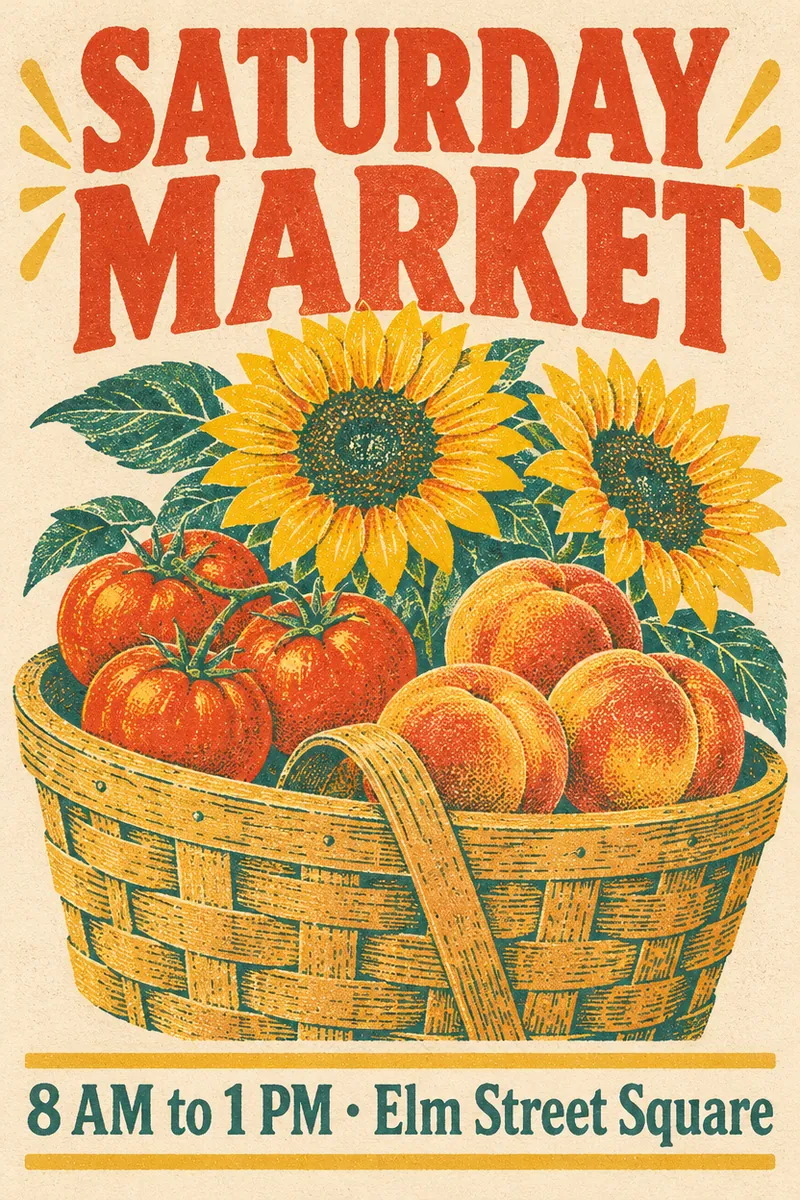
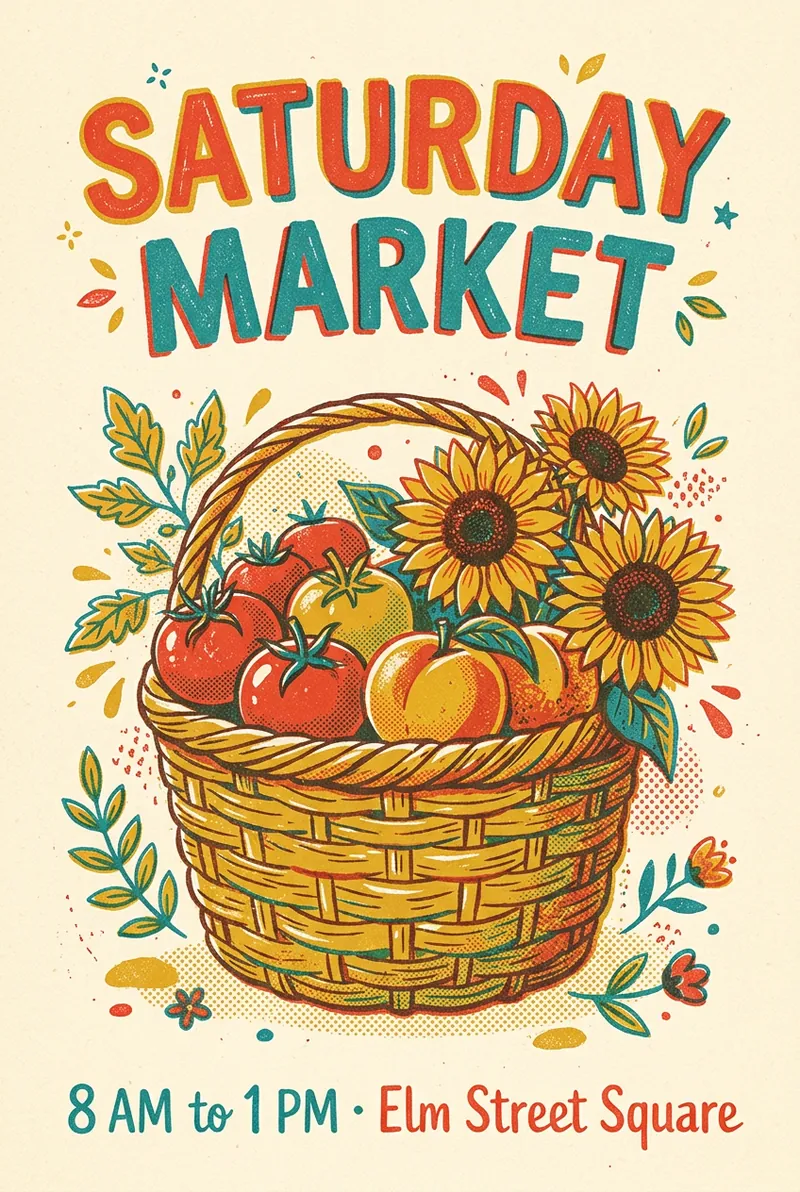
A risograph-style poster with a big title, a basket and a time line.

Farmers market poster by OpenAI in a grainy risograph style
GPT Image 2.6
Farmers market poster by Google in a bright illustrated style
Nano Banana 2.1

Both spelled the headline and the time line correctly. The OpenAI version stayed closer to a real risograph, with grain and a three-color palette; Google drew a brighter, more illustrated poster. Pick by taste.

Teapot product shot from above

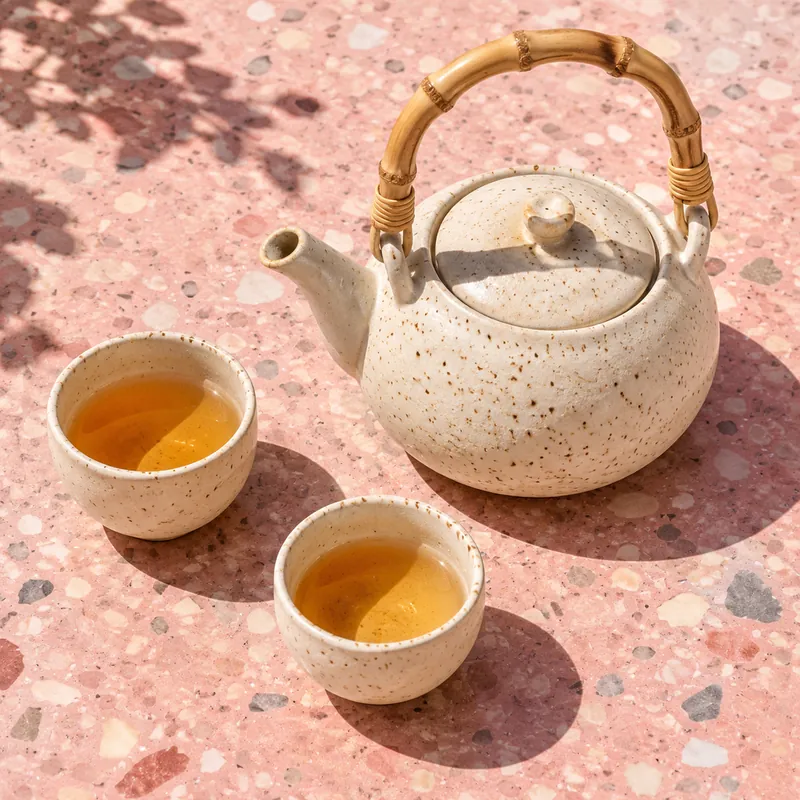
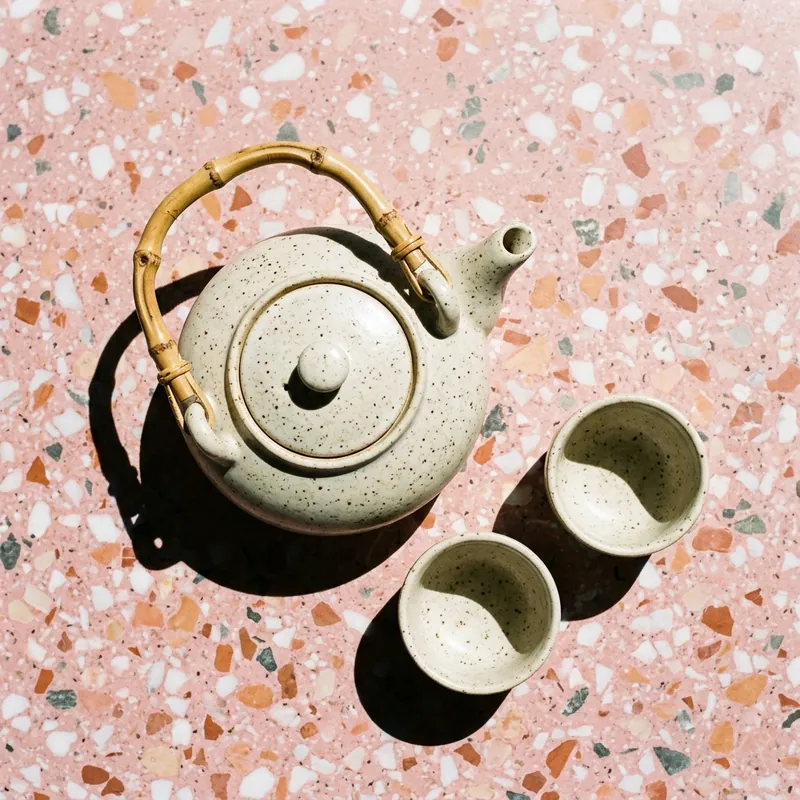
A ceramic teapot and two cups on pink terrazzo, shot top-down.

Teapot and two cups of tea on pink terrazzo, seen from an angle
GPT Image 2.6
Teapot and two empty cups on pink terrazzo, seen from directly above
Nano Banana 2.1

Google followed the camera note: a true top-down view. The OpenAI version chose a three-quarter angle and filled the cups with tea, which looks inviting but is not what we asked for.

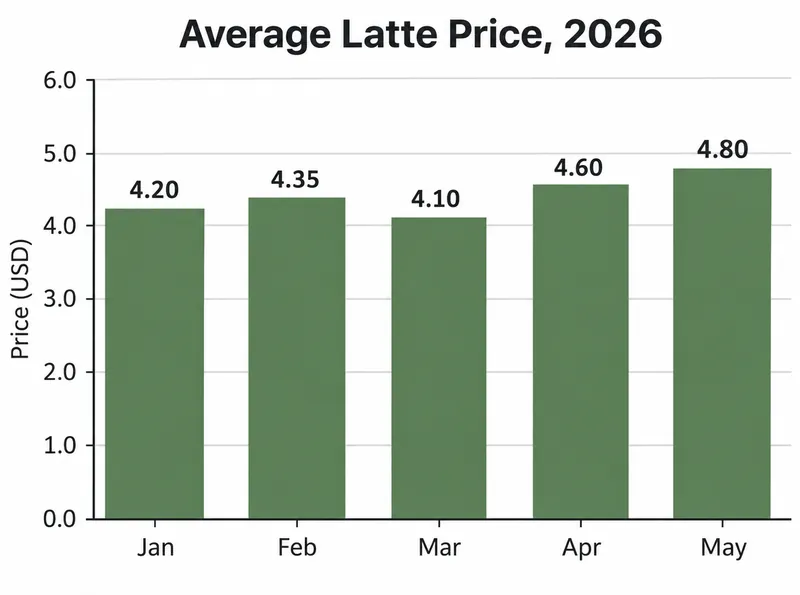
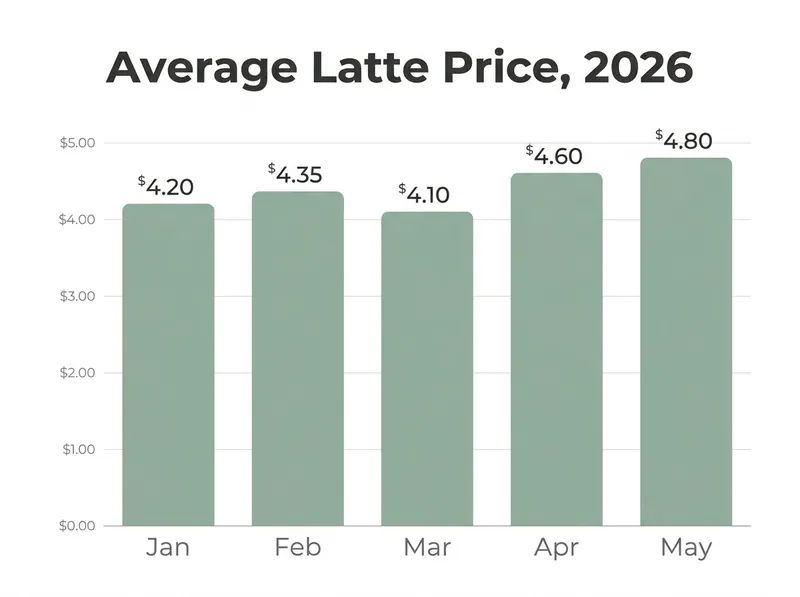
Bar chart with five values

A titled bar chart with month labels and a price above each bar.

Latte price bar chart by OpenAI with an axis title
GPT Image 2.6
Latte price bar chart by Google with dollar signs on the values
Nano Banana 2.1

A tie on accuracy: every label and value is right in both. OpenAI added an axis title; Google added dollar signs and kept the bars a softer, more muted green, as asked.

Product Edit: GPT Image 2.6 vs Nano Banana

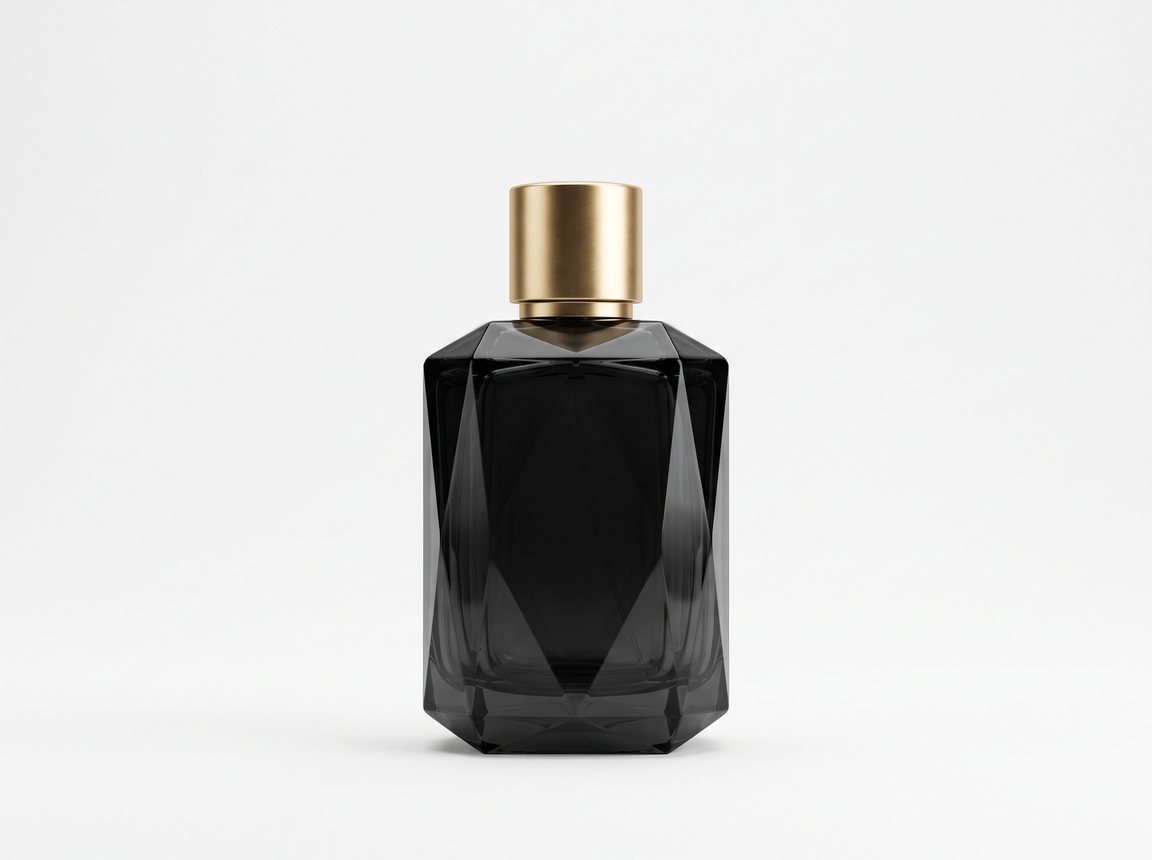
Edits show the biggest gap. Both models got the same photo and the same instruction: keep the bottle, change everything around it.

Move a perfume bottle into a forest

Black faceted perfume bottle on a plain white background
Before
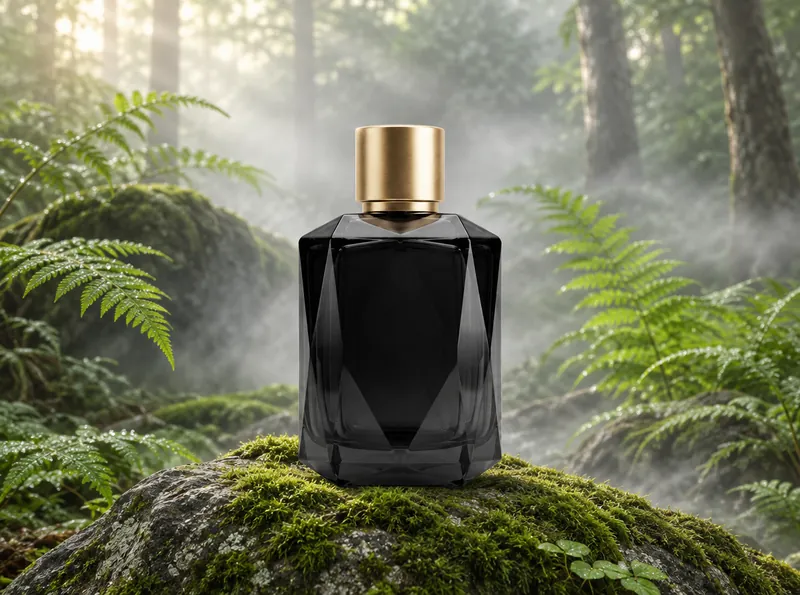
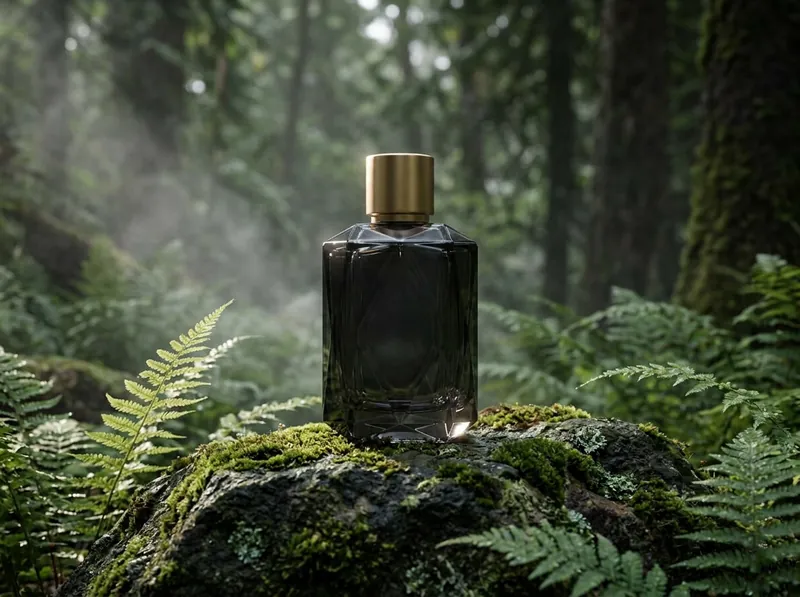
The same faceted bottle on a mossy rock in a misty forest
GPT Image 2.6
A smoother dark bottle on a mossy rock among ferns
Nano Banana 2.1

We asked both to keep the bottle exactly as it is. OpenAI kept the sharp facets, the proportions and the gold cap. Google put a similar bottle in a lovely scene, but the glass came out smoother and smaller, so it no longer matched the product.

If the product has to stay identical, as it does for a store listing or an ad, use GPT Image 2.6 for the edit. If you only need a nice scene with a similar object, Nano Banana 2.1 does the job for fewer credits.

Where Each One Slipped

Neither model was perfect, and the misses were different in kind. GPT Image 2.6 sometimes improves on the brief instead of following it: it picked its own camera angle for the teapot and poured tea nobody asked for. In a first test with wireless earbuds it also drew a charging case that looked a lot like a famous brand's design, even though the wording said no logos, so we left that pair out and used the teapot instead.

Nano Banana 2.1 takes framing notes literally and draws clean graphics, but in the edit it redrew the product rather than keeping it. For a store listing, that matters more than a pretty background.

Tips That Work on Both

  • Put every word that must appear in double quotes. Both models spelled quoted text correctly in all of our tests.
  • Name the camera: top-down, eye level, or close-up. Google honors it; OpenAI needs it said plainly, sometimes twice.
  • For edits, say what stays and describe it: the facets, the color of the cap, the label. The more specific you are, the less either one redraws.
  • Describe a product by shape, material and color, not by the kind of item, so neither drifts toward a well-known design.

Speed on Launch Week

Processing times on WaveSpeed, one run each: GPT Image 2.6 took 10 seconds for the poster, 14 for the chart and 15 for the edit. Nano Banana 2.1 matched it on the edit at 15 seconds but took 34 on the chart, and its poster took more than four minutes. The teapot took both models about 37 seconds. Two days after a launch, demand moves these numbers a lot, so treat them as a snapshot.

Price: GPT Image 2.6 vs Nano Banana 2.1

API list prices on WaveSpeed on November 6, 2026, for one image from a text prompt, with OpenAI's Flare tier at the medium setting:

SizeOpenAIGoogle
1K$0.05$0.04
2K$0.10$0.06
4K$0.18$0.135

On Banana Img you pay in credits. The OpenAI option is 25, 45 or 70 credits for 1K, 2K or 4K; Nano Banana 2.1 is 10, 15 or 33. Plans and credit packs are on the pricing page.

Which One Should You Use?

Use GPT Image 2.6 for product work. Edits that must keep a real item unchanged, packaging, and layouts where the look has to follow a style closely.

Use Nano Banana 2.1 for volume. It is cheaper per image, follows framing notes well, and is the default model on our homepage.

Not sure? Run both. Switch the model in the tool and keep the wording the same. That is exactly how we made the comparisons on this page.

A typical split: a shop owner drafts lifestyle scenes and social posts on Nano Banana 2.1, where each run costs less, then moves the hero product shot to OpenAI's model, where the bottle, box or shoe has to come back exactly as photographed. A designer making a poster series can stay on either one, because both set type cleanly; the choice there is about the look you want.


How We Tested

Every image came from one run on November 6, 2026, through the WaveSpeed API, with the settings this site uses: Flare for OpenAI and the default for Google, all at 1K. Both got the same wording, word for word. We did not rerun anything to get a better result and did not retouch the images. The edit used the perfume photo from our homepage as the source.

What Is New in GPT Image 2.6

OpenAI's release made images faster to generate, improved edit consistency and responses to sketches, and added animated GIFs, SVG output in the API and photo markup, where you circle the spot to change. Banana Img runs the Flare tier for still images; the GIF and markup features are not available here yet.

GPT Image 2.6 vs Nano Banana FAQ

Is GPT Image 2.6 better than Nano Banana 2.1?

Neither won every test. GPT Image 2.6 kept a product exactly as it was during an edit; Nano Banana 2.1 followed a camera instruction more closely and costs fewer credits. For text, both were flawless in our runs.

Why does GPT Image 2.6 cost more credits here?

Its API price is higher: $0.05 per 1K image against $0.04 for Nano Banana 2.1, and the gap grows at 2K and 4K. We price both to keep the same margin, so a 1K run is 25 credits on the OpenAI side and 10 on the Google side.

Which GPT Image 2.6 tier runs on Banana Img?

Flare, the fast tier, at the medium setting. The slower Sunburst tier is not offered here.

Were the sample images edited afterwards?

No. Each came from one run on November 6, 2026, at 1K, through the same API this page uses. We did not pick the best of several tries.

Which one is better for posters and flyers?

Both set the text correctly. Pick by style: OpenAI leaned toward a printed, grainy look that matched our risograph brief, Google toward bright illustration.

Do both support 4K output here?

Yes. 1K and 2K are open to every account; 4K needs a paid plan for both models, and the credits for each size are shown on the button before you run.

Can I make GIFs here?

Not yet. OpenAI offers GIF and SVG output in ChatGPT and its API; this generator returns still PNG files for both models.

Do I need separate credits for each model?

No. One credit balance covers both. Each run takes the amount shown on the button for the model and size you picked, and failed runs are refunded automatically.

Is Banana Img made by OpenAI or Google?

No. Banana Img is an independent website that runs both models through an API. GPT Image belongs to OpenAI and Nano Banana to Google.

Run GPT Image 2.6 vs Nano Banana Yourself

Bring one idea, run it on both models and keep the result you like. Every image you make is saved under My Images.

Seedream 5.5 vs Nano Banana

Banana Img is an independent website, not affiliated with OpenAI or Google.